
Why Precision and Privacy Matter in the Digital Age
In an era where the “paperless office” is no longer a dream but a standard, the Portable Document Format (PDF) has become the universal language of business. Whether you are a legal professional in London, a real estate agent in Toronto, or a graduate student in New York, you deal with PDFs daily.
However, there is a recurring headache we all face: Document Fragmentation. You have a contract in one file, an addendum in another, and a set of IDs in a third. Sending them as separate attachments is unprofessional and risky. This is where the art of merging PDFs comes in. But here is the catch—not all merging tools are created equal.
Why Merging PDFs is a Productivity Superpower
Before we dive into the “how,” let’s talk about the “why.” Document management is a silent productivity killer. Research suggests that employees spend nearly 20% of their workweek just looking for internal information or tracking down files.
This is why we built our Advanced Merge PDF Tool. It doesn’t just “merge”—it lets you manage.
1. Professionalism and Branding
Imagine sending a job application to a top firm in London or Paris. If you send five separate files (Resume, Cover Letter, Certificates, Portfolio, References), you are forcing the recruiter to do extra work. By merging them into one polished, chronological PDF via DailyWebUtils, you demonstrate organizational skills before they even read your first sentence.
2. Streamlined Legal and Financial Workflows
In countries like the USA and Canada, legal compliance and “Audit Trails” are strict. Merging related invoices, receipts, or court documents into a single “Master File” ensures that nothing gets lost in the shuffle. It creates a seamless narrative for auditors and legal teams.
3. Reduced “Attachment Fatigue”
We’ve all experienced the panic of an email thread with 15 attachments. “Is this the latest version?” “Where is the signed copy?” Merging files eliminates this clutter. One file means one version of the truth.
The Security Dilemma: Why Most “Free” Tools are Dangerous
If you search for “Merge PDF” on Google, you will find thousands of results. Many of them claim to be free. But as the saying goes, “If you aren’t paying for the product, you ARE the product.”
Many free online converters in the UK and USA have been caught storing user data or selling metadata to third-party advertisers. For a business handling sensitive contracts or a student handling private academic records, this is a nightmare.
This is where DailyWebUtils Changes the Game
We built DailyWebUtils with a “Privacy-First” philosophy. Unlike big corporate tools that lock features behind a $19/month paywall or store your data on overseas servers, DailyWebUtils is 100% Free and Secure.
- No Watermarks: Most “free” tools ruin your professional documents with a giant logo. We give you a clean, high-fidelity output every time.
- No Data Retention: Your files are processed and then immediately purged. We don’t want your data; we want your trust.
- Browser-Based Speed: Our engine is optimized for speed, whether you are on a high-speed fiber connection in Toronto or 5G in New York.
Step-by-Step: How to Use the Advanced Merge PDF Tool on DailyWebUtils
We didn’t just build a merger; we built a Document Curating Suite. Here is how you can master your files in seconds:
Step 1: Secure Upload
Navigate to . You can drag and drop multiple files at once. Our system handles everything from 2-page memos to 500-page manuscripts.
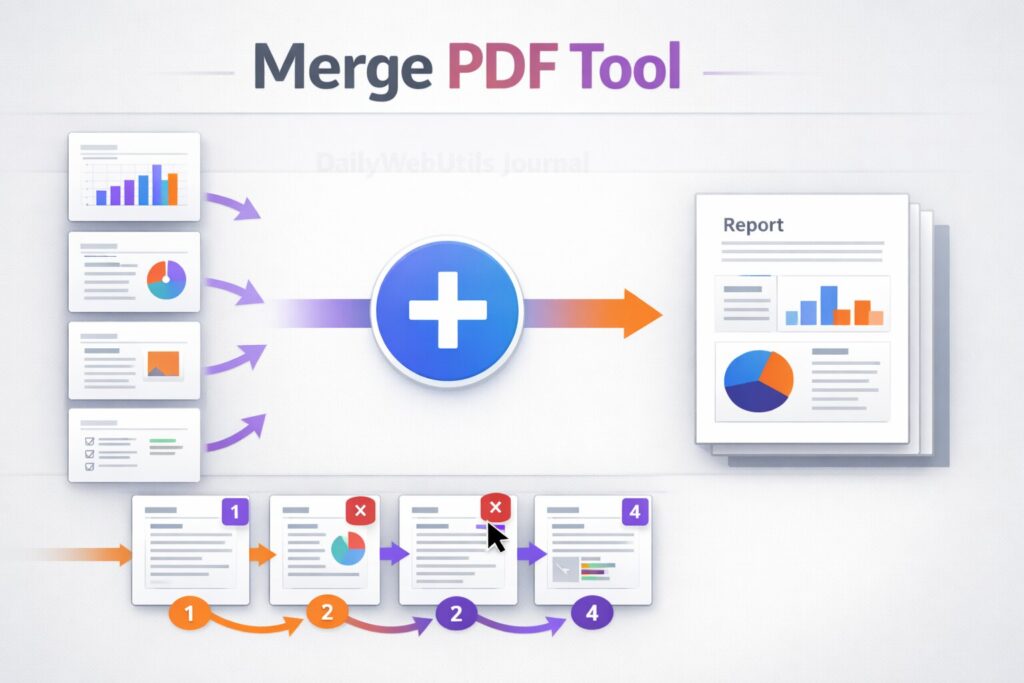
Step 2: Individual Page Previews (The Game Changer)
This is where we beat the competition. Most tools show you “File 1” and “File 2.” DailyWebUtils generates a high-quality thumbnail for every single page within those files. You can see exactly what you are merging before you hit the button.
Step 3: Smart Reordering and Deletion
Did you realize Page 4 of your second document is a blank page or a redundant duplicate? Simply click the Red “X” icon on the thumbnail to delete it. Want the “Conclusion” to appear before the “Appendix”? Just drag and drop the pages into the perfect sequence.
Step 4: High-Fidelity Merge
Once you are satisfied, click “Merge Selected Pages.” Our server uses high-fidelity Ghostscript technology to ensure that your images remain sharp and your fonts stay embedded.
Tailored PDF Solutions for Global Users
For the USA & UK Corporate Sector
In the fast-paced markets of New York and London, time is currency. Our tool allows for “Instant Reset,” meaning you can finish one project and start the next without refreshing the page.
For Canadian and Australian Students
With strict submission portals like Canvas or Blackboard, file size and organization are key. Use our tool to combine your research papers and citations into one compliant document.
For European Privacy Standards (GDPR)
Users in France, Germany, and the EU are rightfully concerned about data privacy. DailyWebUtils adheres to the highest standards of digital hygiene, ensuring your documents remain your business alone.
Frequently Asked Questions (FAQs)
Q: Is there a limit on how many PDFs I can merge?
A: While most “Premium” competitors limit you to 5 or 10 files, DailyWebUtils allows you to merge a substantial number of documents for free, provided they fit within standard browser memory limits.
Q: Will I lose the quality of my images after merging?
A: No. Our merging engine is designed to preserve the original DPI (Dots Per Inch) of your images and the vector quality of your fonts.
Q: Can I merge password-protected PDFs?
A: For security reasons, you must unlock a PDF before merging it. This ensures that the person merging the document has the legal right to access the content.
Conclusion: Take Control of Your Digital Paperwork
The world is moving faster than ever. You shouldn’t be held back by clunky, expensive, or insecure software. Whether you’re working from a home office in Vancouver or a skyscraper in Manhattan, you deserve professional-grade tools.
DailyWebUtils is more than just a website; it’s a productivity partner designed for the modern user who values speed, privacy, and simplicity.