
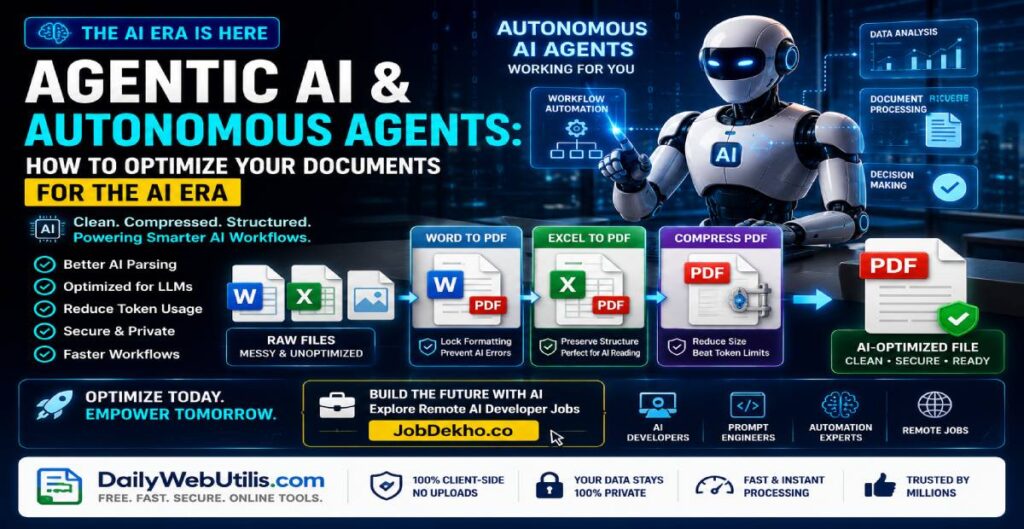
The year 2026 marks a massive paradigm shift in artificial intelligence. We have officially moved past basic conversational chatbots and entered the era of Agentic AI and Autonomous Agents. Unlike traditional systems that simply answer questions, autonomous agents can execute complex multi-step workflows, manage corporate databases, write code, and make standalone operational decisions.
However, as enterprises rapidly deploy these next-gen AI frameworks, a critical bottleneck has emerged: Data Ingestion and Processing Efficiency.
If your corporate files, spreadsheets, and data presentations are messy, unoptimized, or format-broken, your AI agents will hallucinate, fail to parse instructions, or hit strict API token limits. In this comprehensive guide, we analyze how to format and secure your documents for the Agentic AI ecosystem using the lightweight tools on DailyWebUtils.
Why Autonomous AI Agents Struggle with Raw and Messy Files
Autonomous AI agents operate by scanning, parsing, and vectorizing the documents you feed them. When you upload unoptimized raw files, you introduce massive processing friction:
- The Token Limit Crisis: Large Language Models (LLMs) and AI agents measure data in tokens. High-resolution images or uncompressed documents consume massive amounts of tokens unnecessarily, driving up API costs and causing the agent to truncate critical data.
- Broken Document Architecture: Raw text layers in messy Word documents or unformatted Excel sheets make it incredibly difficult for an autonomous agent to map out data hierarchies. This leads to inaccurate analysis and broken automated actions.
- Data Extraction Latency: Heavy, unoptimized files slow down an AI agent’s processing speed. In fast-paced agentic pipelines where real-time execution is required, document latency can break the entire automation loop.
The Optimization Framework: Formatting Files for AI Workflows
To ensure your autonomous agents operate with maximum speed and 100% data accuracy, your document workflows must be cleanly structured.
1. Transform Raw Visuals into Clean Vector Data
AI agents process text layers exponentially better than raw images. If you have screenshots of data, receipts, or text sheets, do not feed them directly to the agent as .jpg or .png files. Use our free Image to PDF Tool to wrap them into a continuous, structured document framework. This allows the AI’s OCR systems to crawl the text seamlessly without missing hidden elements.
2. Lock Formatting to Prevent AI Hallucinations
When feeding business schemas or financial reports to automated workflows, editable formats risk data misalignment. Convert complex files into stable layouts using the Word to PDF Converter or the Excel to PDF Converter. This locks the layout rows, fonts, and bounding boxes, giving the autonomous agent an unalterable structural blueprint to analyze.
3. Compress Files to Beat LLM Token Caps
Large corporate files often get rejected by AI pipelines due to system upload limits. To feed comprehensive datasets to your agent without hitting text limits or blowing through your API budget, run your files through our hyper-efficient Compress PDF Engine. It minimizes the file footprint instantly while keeping the underlying text layer perfectly crisp for AI scanning.
💡 Career Pro-Tip for Tech Professionals: As Agentic AI scales, the global demand for AI prompt engineers, workflow automation experts, and full-stack developers is skyrocketing. If you have experience building or optimizing systems for autonomous workflows, compile your technical portfolio into a clean PDF using DailyWebUtils and explore high-paying remote roles on JobDekho.co today!
The DailyWebUtils Advantage: 100% Client-Side Privacy
In the age of AI automation, corporate data leaks are a massive concern. Many online utility tools upload your files to external cloud databases, running the risk that your proprietary company data could be used to train public models.
DailyWebUtils addresses this vulnerability with a strict Zero-Upload Privacy Protocol:
- Pure Browser-Based Execution: Every single conversion and compression tool on our platform runs entirely client-side. Your sensitive financial models, code scripts, and company data are processed locally within your web browser.
- Absolute Data Isolation: Your files are never uploaded to any external servers or databases. Because we never receive your files, it is mathematically impossible for your corporate data to be leaked or scraped by malicious AI bots.
- Fast, SaaS-Oriented Performance: No server queues mean zero waiting times. Maximize your workflow efficiency with instant document optimization right from your dashboard.
Frequently Asked Questions (FAQ)
1. Why should I convert files to PDF before feeding them to an AI agent?
Ans: PDF files act as an optimized container for text data. They remove messy editing metadata, standardize fonts, and preserve structural hierarchies, allowing autonomous agents to parse, extract, and vectorize information with much higher precision and lower hallucination rates.
2. Does compressing a document on DailyWebUtils reduce text quality for AI scanners?
Ans: No. Our advanced compression engine operates on a lossless text layout principle. It dramatically reduces file size by optimizing embedded resources and compressing background visuals, but leaves the core typography and text layer entirely crisp and fully readable for LLM scrapers.
3. Is it safe to process proprietary corporate data on DailyWebUtils?
Ans: Yes, it is entirely safe. DailyWebUtils is an enterprise-grade platform built on a 100% browser-based architecture. Your business documents never leave your local machine, ensuring full data privacy compliance and zero server retention.
Optimize Your AI Automated Pipeline Today
Don’t let unoptimized documents break your autonomous workflows or inflate your API token usage. Ensure seamless data ingestion for your Agentic AI frameworks instantly.